


Key Takeaways:
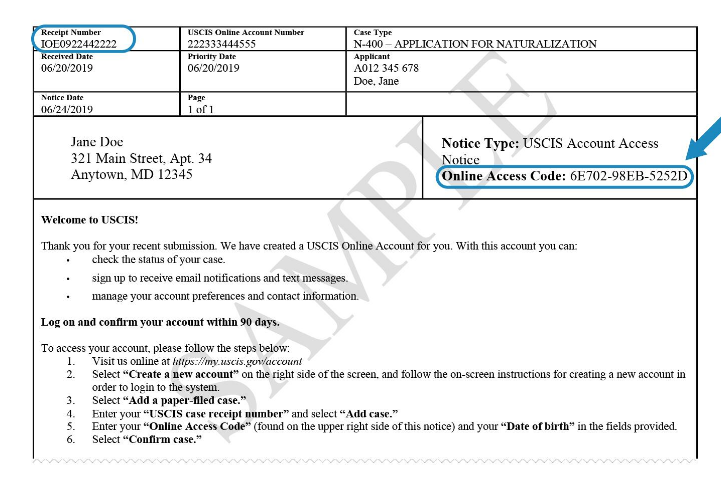
- Access Your Account: Visit https://myaccount.uscis.gov/users/password/new, choose “I need help with getting a new online access code,” and enter your contact information.
- Verify Your Identity: Select your preferred method (email or text) to receive a temporary code, follow the instructions to verify your identity, and log in with the received code.
- Reset Credentials and Update Profile: Create a new online access code, navigate to “Profile” to update your contact information, and bookmark the recovery page for future reference.
Step-by-Step Guide:
- Visit the USCIS Account Recovery Page:
- Head over to https://myaccount.uscis.gov/users/password/new
- Click “I need help with getting a new online access code.”
- Provide Your Information:
- Enter your email address or username (if known) and your first and last name.
- Click “Next” to proceed.
- Choose Your Verification Method:
- Select how you want to receive your temporary online access code.
- You can choose to receive it by email or text message.
- Verify Your Identity:
- If you chose email, check your inbox for an email from USCIS containing your temporary code.
- If you chose text message, check your phone for the code.
- Enter Your Code and Reset Your Account:
- Go back to the USCIS login page and enter your email address or username, followed by the temporary code you received.
- Click “Next” to reset your password and create a new online access code.
- Update Your Profile:
- Once you’ve successfully logged in, navigate to the “Profile” section.
- Update your contact information, including your preferred email address and phone number.
- This will help you avoid losing your access code again.
Additional Tips:
- If you don’t receive the temporary code within 15 minutes, try resending it or choosing a different verification method.
- Make sure you’re entering the correct email address or username associated with your USCIS account.
- If you’re still having trouble retrieving your number, you can contact USCIS directly for assistance.
Remember:
- Keep your online access code confidential and don’t share it with anyone.
- Update your contact information regularly to ensure you receive important updates about your immigration application.
- Bookmark the USCIS account recovery page for future reference.
By following these steps and adhering to the helpful tips provided, you can easily retrieve your lost USCIS online account number and regain access to your valuable immigration application information.


[…] you’ve misplaced your online account number or are locked out of your account, visit our article for a straightforward process to retrieve […]
[…] More How to Retrieve Your Lost USCIS Online Account Number: A Simple Guide December 13, 2023 […]