(UNITED STATES) For most people applying for a nonimmigrant visa to the United States 🇺🇸, the DS-160 Form is the main application that sits behind everything that happens next: your interview appointment, the questions a consular officer asks, and the security checks that run in the background. One part of that form often surprises applicants and causes avoidable refusals—the requirement to list your social media history for the past five years.
The U.S. Department of State requires virtually all nonimmigrant visa applicants to disclose their social media presence for the last 60 months as part of mandatory security vetting. This is not a “nice to have” field. It’s a required disclosure, and the way you answer matters. Leaving out an account—even an old one, a “private” one, or one you deleted—can be treated as a material misrepresentation, which can lead to a visa denial and, in serious cases, a permanent ban.
This guide walks you through the full process—what to prepare, exactly where the questions appear in the online form, how to find the right identifiers on common platforms, and how to handle tricky situations like deleted accounts or forgotten usernames—so you can complete the social media section accurately and confidently.
What this question is really asking (and why accuracy matters more than appearances)
The social media question on the DS-160 Form is designed to help the government match your application to your online identifiers during screening. It is not asking whether your profile is “public,” whether you post often, or whether the account looks professional. It’s asking whether you had a presence and what identifiers were used to find it.
That’s why two mistakes can cause serious problems:
- Omission: not listing an account that existed within the last five years, including accounts you rarely used (“lurking”), pseudonymous accounts, and deleted accounts.
- Wrong identifier: listing a platform but giving the wrong handle or profile link slug, which can look like you were trying to hide the account.
According to analysis by VisaVerge.com, applicants often focus on “cleaning up” profiles instead of focusing on what consular processing rewards: complete, consistent disclosure that matches what screening tools can find.
Preparation before you open the application: your 5-Year Audit
Before you log into the Consular Electronic Application Center (CEAC) — DS-160 and start entering data, do a 5-Year Audit of your digital footprint. The source material is clear on the practical reason: if you have more than one account, you can’t safely complete this section from memory alone.
Your job in this phase is to build a simple list for every account held in the last 60 months, including accounts you no longer use.
For each account, gather:
- Platform name (examples listed in the form’s dropdown include Facebook, Instagram, LinkedIn, Twitter (X), YouTube, and others)
- Identifier (the username, handle, or vanity URL used to find your profile)
- Status (still active, deleted, suspended, or you lost access)
Two common misunderstandings to avoid during the audit:
- Passwords are not required. The guide is explicit: never enter your password on the DS-160.
- Business accounts require judgment. The form asks for “your” social media. But the guide advises that if you are a solo practitioner or your name is strongly tied to a business profile you manage (example given: “JohnDoePhotography”), it is safer to disclose it. By contrast, a corporate account run by a team (example given: “General Electric PR Team”) generally does not need to be listed unless you are the primary face/user.
Treat this audit like building your reference sheet. Once you start the form, you’ll move faster and make fewer mistakes.
Starting the DS-160 in CEAC and locating the Social Media section
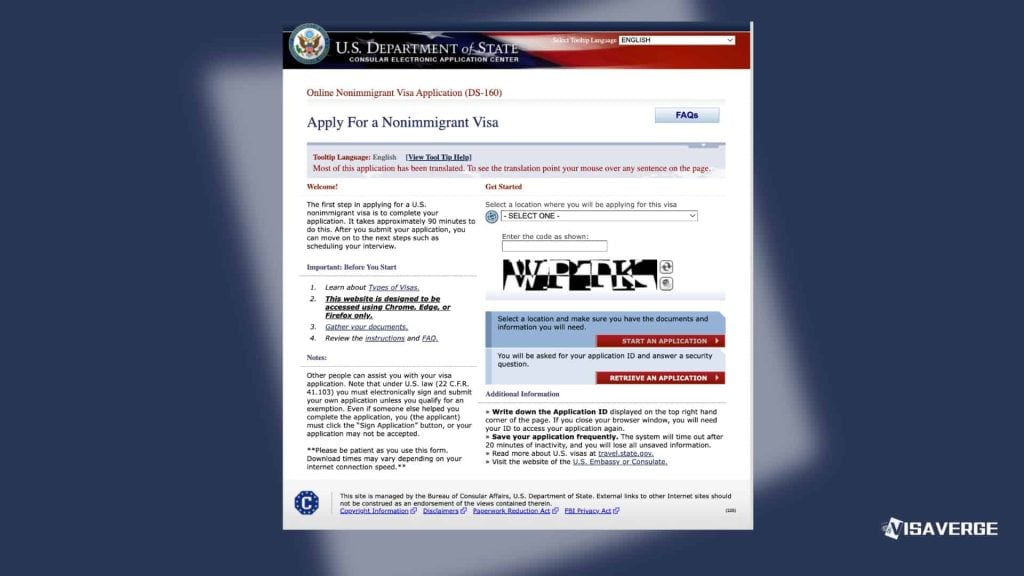
You complete the DS-160 Form through the U.S. Department of State’s CEAC system. Use the official page here: Consular Electronic Application Center (CEAC) — DS-160. That is also where you return to continue an application you started earlier.
Within the DS-160, the Social Media section appears in the middle of the application, placed between two other sections. Knowing the neighbors helps you find it quickly and avoid skipping it:
- The section that comes immediately before it: Address and Phone Information
- The section that comes immediately after it: Passport Information
- The section title you’ll see on-screen: “Social Media”
Expect this part to feel like a checklist: you’ll answer a primary “presence” question, then fill in a table/grid, then answer a follow-up question about other websites or apps.
Step-by-step: answering the primary question and opening the entry grid
Step 1: “Do you have a social media presence?”
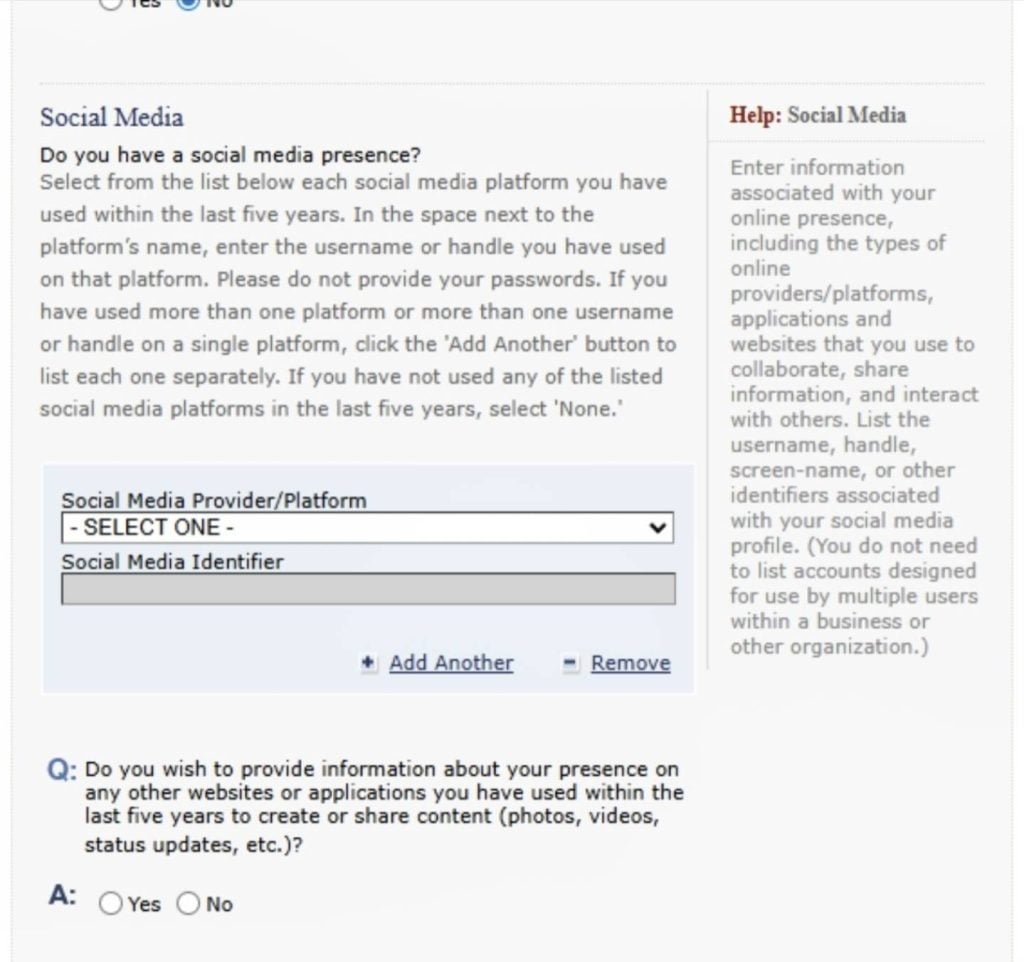
The form asks: “Do you have a social media presence?”
- Select “Yes” unless you truly have no digital footprint (the guide notes this is rare).
- When you select “Yes,” the form opens a grid with two columns:
- Social Media Provider/Platform
- Social Media Identifier
This is where the quality of your 5-Year Audit pays off. You are not writing an explanation. You are matching each platform to the exact identifier that points to your profile.
Step 2: Choose platforms from the dropdown list
Click the Social Media Provider/Platform dropdown. The guide notes that the list includes major global platforms and also regional/international ones.
Examples of platforms in the standard list include:
- Facebook, Flickr, Instagram, LinkedIn, MySpace, Pinterest, Reddit, Tumblr, Twitter (X), YouTube
Examples of regional/international platforms listed include:
- Douban, QQ, Sina Weibo, Tencent Weibo, Twoo, VK (Vkontakte), Youku
Select the first platform where you had an account within the last five years.
Step-by-step: entering the correct identifier (the make-or-break field)
Step 3: Enter the “Social Media Identifier” exactly
The identifier is the searchable string that leads to your account: a username, handle, custom URL slug, or numeric ID. The guide emphasizes: do not simply type your full name unless your full name is literally your handle.
Use platform-specific methods to avoid guessing:
- Facebook
- How to find it: go to your profile page and look at the URL in the browser bar.
- Typical format:
www.facebook.com/username - What to enter: the text after the slash (example given: john.doe.55)
- If there’s no username and you see a numeric profile URL like
facebook.com/profile.php?id=100004455, enter the ID number (example given: 100004455).
- Instagram / Twitter (X) / TikTok
- How to find it: look at your profile.
- What to enter: your handle, often shown with an
@(example given: @johnskywalker). - The guide notes you can enter it with or without the
@.
- LinkedIn
- How to find it: go to your profile, click “Contact Info,” or look at the public profile URL.
- Typical format:
linkedin.com/in/johndoe-mba - What to enter: the custom slug after
/in/(example given: johndoe-mba).
- YouTube
- The guide highlights a key point: if you log in to watch videos, comment, or save playlists, you have a “presence.”
- What to enter: your channel name or custom URL handle (example given: UserJohnDoe).
Practical rule: if someone asked you, “What do I type into a search box to find this account?”, your identifier should match the answer.
Listing more than one account: duplicates, pseudonyms, and older profiles
Step 4: Multiple accounts on the same platform
Many applicants have more than one account on the same platform: a “Finsta,” a burner account, or an old profile they stopped using years ago. The guide’s instruction is direct: list every single account on that platform from the last five years.
How to enter them:
- Click “Add Another” under your first entry.
- Choose the same platform again (for example, Instagram).
- Enter the second handle.
- Repeat until all accounts for that platform are included.
This applies even if you think the older account is “irrelevant” or forgotten. The form is about disclosure, not about explaining your habits.
Step 5: Add different platforms the same way
For each additional platform:
- Click “Add Another.”
- Select the next platform (for example, LinkedIn).
- Enter the identifier.
- Repeat until you have listed every platform that applies.
This is where your 5-Year Audit list should prevent a common mistake: stopping after “the big ones” and forgetting older or less-used platforms like MySpace or Reddit.
When your platform isn’t in the dropdown: “other websites or applications”
Step 6: The follow-up question below the grid
Below the main grid, the form asks:
“Do you wish to provide information about your presence on any other websites or applications you have used within the last five years to create or share content?”
When to check “Yes” (based on the guide):
- If you use a major platform that is not in the dropdown list in your version of the form but is used for public sharing (examples: TikTok or Snapchat if missing)
- If you use niche forums where you are public (example: Discord servers where you are public)
If you select “Yes,” the guide instructs you to type:
- The name of the site (example: TikTok)
- Your handle (example: @tiktokuser)
When to check “No” (based on the guide):
- If you only use other apps for private one-to-one messaging (examples: WhatsApp, Signal, Telegram) and they are not listed in the main dropdown. The guide adds an important detail: unless the form explicitly asks for “Messaging Apps,” which it says is rarer on the DS-160 than the DS-5535.
Edge cases that cause refusals: deleted accounts, forgotten usernames, privacy settings, and “None”
The guide flags several situations that frequently lead to errors. The theme is consistent: attempted disclosure is safer than silence.
Deleted accounts still count within the 5-Year Audit window
If you deleted an account two years ago, you still used it within the last five years. The guide’s direction:
- Select the platform (example: Twitter)
- Enter the old handle
It also explains why: the form does not ask whether the account is active—only whether you used it in the last five years.
Forgotten usernames: disclose what you can, don’t omit
If you remember having an account (example: a MySpace account four years ago) but can’t remember the handle:
- Try recovering it through an email search.
- If recovery is impossible, enter the best approximation, or enter the email address associated with it in the identifier field.
- Alternatively, use “Other” and write something like: “MySpace – Username Unknown (Email: [email])”.
The guide warns: do not omit it simply because you forgot.
Private accounts must be listed
A “Private” setting does not remove the disclosure requirement. The guide is explicit:
- You must list the handle even if only a few people follow you.
- Do not unlock your account unless a consular officer specifically asks during the interview.
Selecting “None” is risky if any profile can be found
If you truly have not used social media in five years, the guide says you can select “None” in the dropdown. But it includes a strong warning: consular officers have access to sophisticated data scraping tools, and if they find a profile matching your identity after you select “None,” your credibility is destroyed.
Tip: when in doubt, disclose. Attempted disclosure is judged more leniently than evidence of concealment.
Final accuracy check before you click “Next” (and what “permanent record” means)
Before you leave the Social Media page, run a final check using the guide’s submission checklist:
- Did you include accounts you used for “lurking” (watching/reading but not posting)? Yes.
- Did you include accounts under pseudonyms? Yes.
- Did you include deleted accounts from four years ago? Yes.
- Did you double-check that you did not paste your password? Yes.
The guide also sets expectations about consequences: once you click “Next,” this information becomes a permanent part of your U.S. immigration file. That’s why the guide’s central message is worth repeating in plain terms: accuracy beats image management. A profile that looks messy but is honestly disclosed is usually judged based on content, while a “clean” profile paired with an omission can be treated as a lie.
The U.S. Department of State requires all nonimmigrant visa applicants to disclose their social media presence from the last five years on the DS-160 form. This disclosure is mandatory for security vetting. Failure to include any account, even those that are deleted or private, can result in a permanent ban for fraud. Applicants should conduct a digital audit to ensure all handles are correctly listed while avoiding password disclosure.